Question
How does the humidity control work?
Answer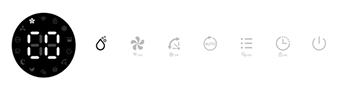
Press the Manual button once to activate manual dehumidification mode or to select the desired humidity level from CO, 30%, 35%, 40%, 45%, 50%, 55%, 60%, 65%, 70%, 75%, 80%, and CO.
Note:
In the ecofort SMART app, CO is displayed as 25%.
Once the target humidity level is reached, both the fan and the compressor switch off. The fan is activated for 5 minutes every hour to monitor changes in humidity.
Do you have any other questions that we have not yet been able to answer? No problem – our advisory team will be glad to assist you: contact ecofort.
Was this article helpful?
That’s Great!
Thank you for your feedback
Sorry! We couldn't be helpful
Thank you for your feedback
Feedback sent
We appreciate your effort and will try to fix the article